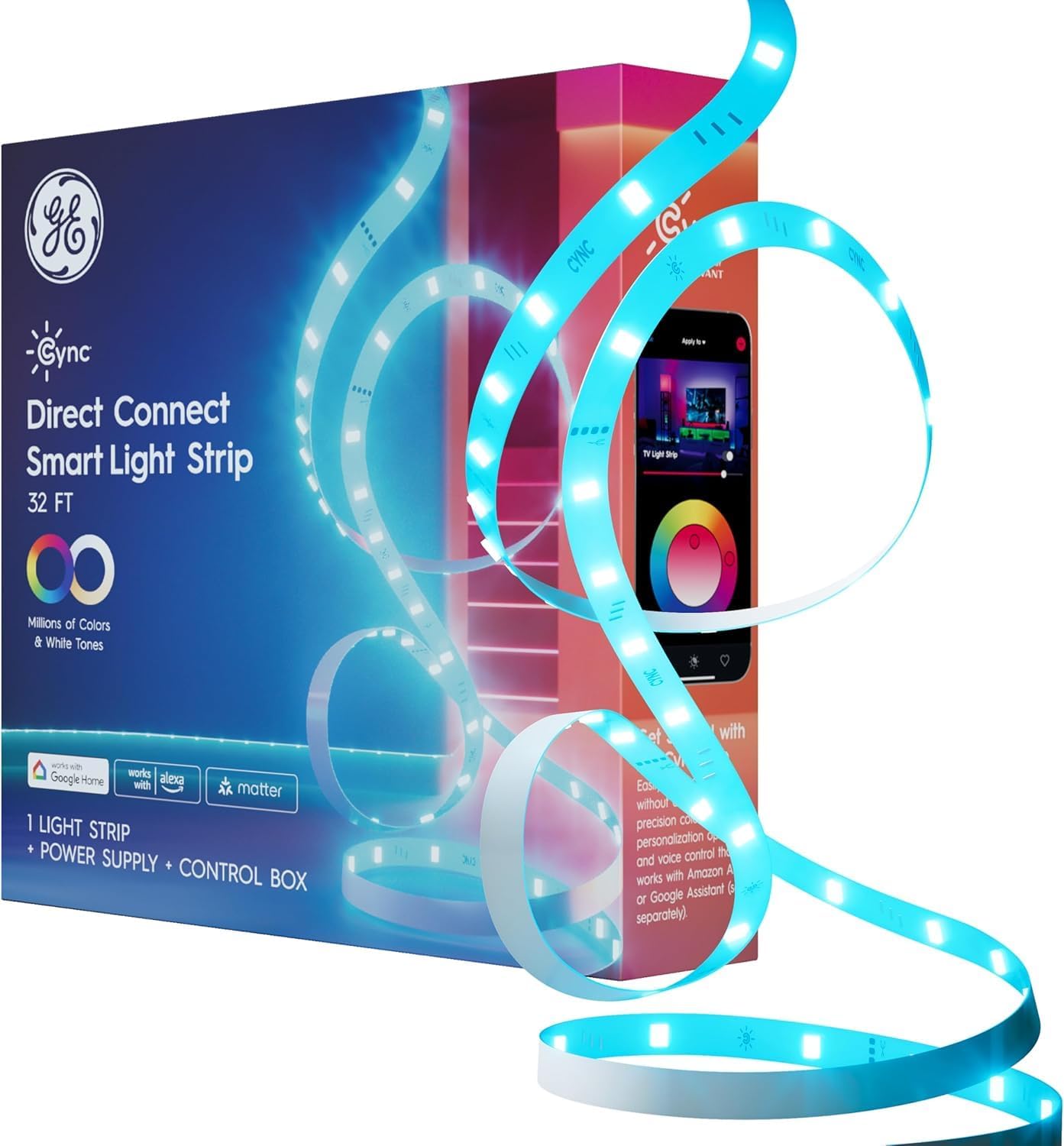
GE Cync Smart LED Strip Light – Home Office Focus Lighting, Schedule Enabled Bias Light for Desk and Workspace
GE Cync Smart LED Strip Light – Home Office Focus Lighting, Schedule Enabled Bias Light for Desk and Workspace
Couldn't load pickup availability
Why you'll love it
- No hub or bridge required — direct 2.4GHz Wi-Fi connection simplifies setup and lowers entry cost
- Matter compatibility future-proofs the purchase within a multi-platform smart home (Alexa, Google, Apple)
- Cuttable and linkable design lets buyers customize length to fit any space without wasting material
- Millions of colors plus tunable white from 2000K to 7000K eliminate the need to buy separate warm/cool or color strips
- Hands-free voice control and app-based scheduling add convenience over traditional plug-in LED strips
- Mounting clips included for a clean, tool-light install that renters can remove without damage
Perfect for
- Add bias/backlighting behind a gaming monitor or TV for an immersive entertainment setup
- Set circadian-rhythm lighting in the bedroom with warm 2000K tones for winding down and cool 7000K for waking up
- Decorate dorm rooms or bedrooms with color-changing accent lighting that can be controlled by voice
- Create holiday and party ambiance with dynamic color light shows via the Cync app
- Schedule lights to turn on/off at specific times for security when away from home
Product Information
LED Strip Lights for Indoor Lighting: Bedroom decor, gaming led lights, or dorm room decor these led WiFi lights install easily and discreetly, lighting effects perfect for holiday decorations; includes a power cord, plug, and mounting clips Millions of Vibrant Colors: Use the Cync app, Powered by Savant color wheel and TrueImage technology to elevate the vibe and enhance your home decor; easily select colors, change modes, adjust brightness, smart timing, set daily schedules and more Sync to Your Life: Adjust your white light to any color between warm, amber light tones (2000K) and cool, bluish tones (7000K), including optimized settings to support your sleep/wake cycle Simple Setup: The LED strip can be cut to size and linked; use the app to control lights at or away from home with no hub or bridge required; a 2.4GHz Wi-Fi connection is required for smart control Voice Control Smart Light: Hands-free control with home automation by connecting the smart light strip to Amazon Alexa or Google Home (devices sold separately) providing a seamless integration into your smart home
Cync Direct Connect Full Color LED Light Strips provide enhanced control, scheduling, dynamic light shows, and millions of vibrant colors to enhance any space – no hub needed. Select from a wide range of white color tones from 2000K to 7000K and pinpoint the perfect white light. Choose from millions of additional colors to enhance the vibe in the room, ideal for entertaining and holiday décor. Enhance your entertainment space by selecting a dynamic lighting effect to rotate through colors and create light shows. Get more out of your lighting with out of home control and scheduling through the intuitive Cync App, powered by Savant and voice control when paired with Amazon Alexa or Hey Google devices. Pair with a Cync Wire-Free Remote or Switch to control your strip light from the couch or bed.
Frequently Asked Questions
Will this actually help me focus during deep work, or is it just decorative?
Bias lighting behind your monitor reduces eye strain by balancing the contrast between the bright screen and the dark room, which lets you work longer with less fatigue. Pairing that with a consistent tunable white around 4000K to 5000K creates a steady focus environment without the distraction of overhead lighting.
Can I schedule the strip to turn on with my morning routine automatically?
Yes. Use the Cync app to set on and off times for weekdays, weekends, or specific days. Many users schedule a cool 6500K tone to ramp up at wake-up time and shift to a warm 2700K tone at the end of the workday to mark the transition out of focus mode.
Does the strip have a timer I can set for Pomodoro sessions?
Through the Cync app you can create schedules and automations that act as a soft timer. Set the strip to shift color or brightness at 25 or 50 minute intervals, and use it as a visual cue to take breaks or wrap up a focus block.
Will bright colors distract me while I'm trying to concentrate?
Stick to a static tunable white between 4000K and 5000K for focused work, which reads as clean daylight without pulling attention. Save the dynamic color shows and rainbow effects for off-hours, breaks, or your post-work wind-down.
Can I dim the strip low enough for late-night writing or coding sessions?
Yes. The strip dims smoothly to a very low level, so you can keep a soft bias light behind the monitor for late-night work without lighting up the whole room or bothering a partner sleeping nearby.
Is this a good LED strip for a home office or remote work setup?
It is one of the best upgrades you can make to a home office. Mount it behind your monitor for bias lighting, under a standing desk for floor-level ambiance, or along a bookshelf to add depth to video call backgrounds without extra clutter on the desk.
What setting is best for a streaming or content creator desk?
Mount it behind the monitor for bias lighting that reduces eye strain during long sessions, then use the Cync app to add a static accent color that matches your stream overlay or brand. It lifts production value without showing on camera.
Will this help me build a more consistent work-from-home routine?
Automations help a lot. Schedule the strip to turn on at your start time, shift color at lunch, and dim at end of day. The visual cue trains your brain into work mode even when the rest of the apartment is full of distractions.
Can I control the strip from my laptop or only my phone?
Control is handled through the Cync app on your phone, plus voice assistants like Alexa, Google, and Apple Home via Matter. There is no native desktop app, but the integrations cover most workstation control needs.
Is this a good gift for someone who just started working remotely?
It is a practical, easy-to-install upgrade that any remote worker can set up in minutes. It improves video call appearance, reduces eye strain, and adds polish to a home office without taking up desk space.
How does this compare to a desk lamp for productivity?
A desk lamp lights your task surface, while a strip behind the monitor provides bias lighting that reduces eye strain and creates a calmer overall room. Used together they complement each other, but a strip covers more screen-size bias than most lamps and frees up desk space.
GE Cync vs Govee for a home office, which is better for work?
Both deliver color and tunable white, but Cync leans toward ecosystem integration with native Matter, Alexa, Google, and Apple Home support over direct Wi-Fi. Govee often has more flashy effect modes, while Cync is the more reliable, scheduling-friendly pick for a structured work routine.
Smart strip vs smart bulb for productivity, which is more useful?
A bulb is good for overhead room lighting, but a strip is purpose-built for monitor bias lighting, which is the single biggest productivity comfort upgrade. If you can only pick one for a workstation, choose the strip.
Will Wi-Fi setup interrupt my work network or slow it down?
The strip connects to a 2.4GHz Wi-Fi network, which is the same band most smart home devices use, and uses very little bandwidth. As long as your router is reasonably modern, the impact on your work network is negligible.
How do I set up the GE Cync Smart LED Strip Light for the first time?
Mount the strip using the included adhesive backing or mounting clips, plug the adapter into a standard wall outlet, download the Cync app, and follow the in-app pairing steps. The strip connects directly to your 2.4GHz Wi-Fi network, so no hub is required. The whole process typically takes under 10 minutes.
How do I cut or extend the LED strip to fit my space?
The strip can be cut only at the clearly marked scissor icons along its length. Use GE Cync-compatible linkable connectors (sold separately) to join multiple strips together if you need more length. Always cut with the strip unplugged, and only connect strips of the same voltage and type.
How do I reset the strip if it won't connect to Wi-Fi?
With the strip powered on, press and hold the power button on the inline controller for about 10 to 15 seconds until the strip pulses or changes color. Release the button, then re-add the strip in the Cync app as a new device. If issues persist, confirm your phone is on a 2.4GHz Wi-Fi network during setup.
Does this LED strip work with Apple HomeKit, Alexa, and Google Home?
Yes. The strip is Matter compatible, which means it works with Alexa, Google Home, and Apple Home through a Matter-compatible hub or controller. You can control power, brightness, color, and scenes from any of those platforms once the strip is added to the Cync app and the relevant ecosystem.
Does it work with SmartThings or other third-party smart home platforms?
Yes. Through Matter, the strip integrates with SmartThings, Apple Home, Google Home, and other Matter-certified ecosystems. Performance and feature parity vary slightly by platform, but core on/off, dimming, color, and scheduling all work.
What is included in the box, and what do I need to buy separately?
The box includes the LED strip in either 16-foot or 32-foot length, a power adapter, an inline controller, mounting clips, and a quick-start guide. You will need a 2.4GHz Wi-Fi network, a smartphone with the Cync app, and optionally a Matter-compatible hub if you want full integration with Apple Home, Alexa, or Google Home automations. Linkable extension connectors are sold separately if you want to chain more than one strip.
Is the LED strip safe to leave on overnight?
Yes. The strip runs on low-voltage DC power via the included adapter, generates very little heat, and is designed for continuous use. Many users schedule it to dim to a low warm tone at bedtime or shut off automatically at a set time using the Cync app.
Will the LEDs dim, flicker, or lose color accuracy over time?
Quality LED strips like this one are rated for tens of thousands of hours of use, and the Cync app helps manage brightness and color settings so the strip does not run at full output unnecessarily. Avoid tightly coiling the strip or mounting it on hot surfaces to maximize lifespan.
What is the difference between a Matter-compatible LED strip and a regular smart LED strip?
A regular smart LED strip typically only works with one or two ecosystems, such as Alexa or Google, and often requires its own brand app for full control. A Matter-compatible strip uses a universal smart home standard, so it works across Alexa, Google Home, Apple Home, SmartThings, and other Matter-certified platforms with a single pairing process, future-proofing your purchase inside an evolving smart home.