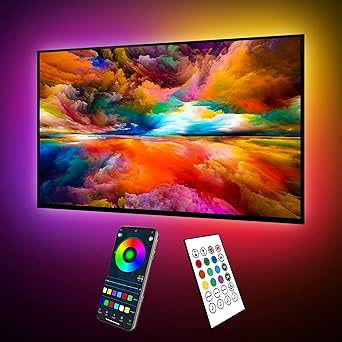
maylit ICRGB TV LED Backlight – Eye-Strain Relief Bias Lighting for Late-Night Movie Marathons
maylit ICRGB TV LED Backlight – Eye-Strain Relief Bias Lighting for Late-Night Movie Marathons
Couldn't load pickup availability
Why you'll love it
- ICRGB multi-color-on-one-line tech delivers a more vibrant, dynamic look than standard RGB strips
- USB power from the TV itself means no extra outlet, no extra switch, and automatic on/off sync
- Dual control (24-key remote + Bluetooth app with 16M colors) gives flexibility for every user
- Music sync via built-in mic turns passive TV watching into an interactive atmosphere experience
- Four size options ensure a tailored fit for TVs from 24-inch bedroom sets to 100-inch home theater screens
- Reduces eye fatigue caused by bright-on-dark TV picture contrast, especially in dim rooms
Perfect for
- Bias lighting behind TV to reduce eye strain during long movie marathons
- Music-synced ambient lighting for parties or casual listening sessions
- Immersive backlighting for console and PC gaming setups
- Decorative TV accent lighting to enhance living room aesthetics
- Soft night-mode glow for late-night TV watching without disturbing others
Frequently Asked Questions
Will this really reduce my eye strain during long movie marathons?
Yes. Bias lighting adds a soft glow behind the TV that reduces the contrast between the bright screen and the dark room, which is the main cause of eye fatigue. Many users notice less tired, dry eyes after multi-hour viewing sessions, especially when watching in dim or dark rooms.
Can I set it to a calming routine for my wind-down evenings before bed?
Yes. Use the schedule function in the app to automatically dim or shift to warm amber tones at your chosen bedtime. Pairing it with the night mode setting creates a soothing pre-sleep atmosphere that supports relaxation without the harsh blue light of the TV itself.
Does the night mode glow disturb partners trying to sleep?
No. The lowest brightness levels on the remote and app produce a very soft, indirect glow behind the TV that lights the wall but not the room. Many users report it is dim enough to leave on all night as a comfort light without disturbing a sleeping partner.
Is the light flickering or harsh on sensitive eyes?
The LEDs are steady and flicker-free at standard viewing, and you have full dimming control down to a very low level. For sensitive eyes, we recommend using the warm white or amber tones in the app at 20-30% brightness for the most comfortable experience.
Can I use this as part of a mindfulness or meditation routine?
Yes. Many users set a slow color cycle or a single warm tone in the app to create a calm focal point during meditation, breathwork, or yoga sessions. The schedule function can also automate a daily reminder glow at the time you start your practice.
I'm recovering from screen fatigue. Will this help me watch TV more comfortably?
Yes. Bias lighting is one of the most recommended adjustments by eye care professionals for comfortable TV viewing. By reducing the contrast between the bright screen and dark surroundings, your eyes no longer have to constantly readjust, which can significantly reduce fatigue-related headaches and tired eyes.
Is the light safe to leave on overnight while I sleep?
Yes. The LEDs run cool and use very little USB power, so leaving them on all night is safe. Many users use the night mode at the lowest brightness as a soft sleep aid or hallway-adjacent comfort light, and the optional 1 or 2 hour timer can shut them off automatically if you prefer.
Will the music sync mode stress me out, or can I keep it off for calm?
Music sync is entirely optional. If you want a calm wellness environment, simply leave it on a single static color and ignore the dynamic modes. The remote and app let you stay on whatever setting supports your mood, including silence on the dynamic front.
Does the warm light help me relax before bed compared to cool blue light?
Yes. The app's warm amber and warm white tones are much easier on the eyes in the evening than the cool blue light emitted by the screen itself. Switching to a warm bias glow 30-60 minutes before sleep is a simple way to support your body's natural wind-down.
Can I set it to gently wake me up with a soft light in the morning?
Yes. The schedule function in the app lets you program an automatic on time and color. You can set it to fade up to a soft warm glow at your wake-up time, creating a gentler alternative to a traditional alarm clock for a calmer morning start.
Is this a good addition to a self-care gift set or relaxation kit?
Yes. It pairs beautifully with candles, essential oil diffusers, and other wellness items as part of a curated self-care setup. Many buyers add it to relaxation gift baskets because it elevates any viewing or meditation space into a more restorative environment.
How do I install the maylit ICRGB TV LED Backlight?
Installation takes about 5-10 minutes. Clean the back of your TV, peel the adhesive backing off the LED strip, and stick it along the back edges of the TV starting from the USB end. Use the included fixing buckles for extra security at the corners. Plug the USB connector into your TV's USB port, turn the strip on with the remote, and pair the Bluetooth app if desired. No tools, no drilling, and no extra outlet required.
Can I cut the strip if it is too long for my TV?
The strip can be trimmed at the marked cut points if needed, but cutting it voids the ability to use the excess length elsewhere. For best results, choose the correct size variant for your TV from the four available options (8.2FT, 16.4FT, 18FT, or 24.6FT) so trimming is not required.
How do I connect the strip to the Bluetooth app?
Turn on the strip, open the app on your iOS or Android device, and the strip will appear in the device list within a few seconds. Tap to pair, and you will have full access to 16 million colors, scheduling, music sync controls, and timer settings. The app also includes additional dynamic modes beyond what the remote offers.
Will this work with my TV that has a USB port?
Yes, the strip is designed for any TV with a standard USB-A port, which is included on virtually all modern TVs. It also works with any 5V USB power source such as a streaming stick, computer, or USB wall adapter, so it is not limited to TV use.
Will it fit my 75-inch TV?
Yes. For 65-75 inch TVs choose the 16.4FT strip, which provides full perimeter coverage. For 75-85 inch TVs the 18FT strip is recommended, and for 85-100 inch TVs use the 24.6FT option. The 8.2FT strip is designed for 24-60 inch TVs.
What is included in the box?
The package includes the ICRGB LED strip in your selected size, a 24-key IR remote, a USB power cable, double-sided adhesive tape pre-applied to the strip, four fixing buckles for extra mounting security, and a user manual. The Bluetooth app is a free download for iOS and Android.
Is this product safe to leave plugged in 24/7?
Yes. The strip uses low-voltage 5V USB power, runs cool, and is designed for continuous use. Since it is powered by the TV, it automatically powers down when the TV is off, so there is no standby draw and no safety concern with leaving it connected at all times.
Will the adhesive damage my TV or leave residue?
No. The included double-sided tape is specifically chosen to adhere securely to TV back panels while removing cleanly without residue. The fixing buckles use gentler adhesive and can also be removed without damage, making the installation fully renter-friendly and reversible.
What is the difference between ICRGB and regular RGB LED strips?
ICRGB technology displays multiple colors simultaneously on a single strip line, producing smooth flowing gradients and richer mixed tones. Standard RGB strips only show one color across the entire strip at a time. The result is a more dynamic, premium look that mimics higher-end ambient lighting systems at a much lower price point.